概要
以下、自分用のメモです。
たまに、古いバージョンのアプリをメンテしたりするときに、「このバージョンのときって、どんな機能が追加された時だっけ??」ってなることがあるので、よく利用する言語毎にメモメモ。。。
C#
まだまだ、業務アプリ界隈では .NET Framework さんは現役です。
Java
Python
Go
Javascript
過去の記事については、以下のページからご参照下さい。
サンプルコードは、以下の場所で公開しています。
以下、自分用のメモです。
たまに、古いバージョンのアプリをメンテしたりするときに、「このバージョンのときって、どんな機能が追加された時だっけ??」ってなることがあるので、よく利用する言語毎にメモメモ。。。
C#まだまだ、業務アプリ界隈では .NET Framework さんは現役です。
過去の記事については、以下のページからご参照下さい。
サンプルコードは、以下の場所で公開しています。
以下自分用のメモです。忘れないうちにメモメモ。。。
次のバージョンである .NET 7 に
されるみたいですね。Publickeyさんの記事にて紹介されています。
パフォーマンスも改善されているみたいなので、期待大です。
.NET 7 は LTS バージョンではないので、次のLTSである .NET 8 待ちということもありますが。。
過去の記事については、以下のページからご参照下さい。
サンプルコードは、以下の場所で公開しています。
忘れない内にメモメモ。。
これはいいですねー。
ついに、1.0に到達。
過去の記事については、以下のページからご参照下さい。
サンプルコードは、以下の場所で公開しています。

.NET 6 も出たので、少し Gitpod さんでC#プロジェクト動かしてみようと思ったのですが、以前に
と同じような感じで、エラーが出て動きませんでした。残念。
.NET なソースは、Github Codespaces 使うというのが一番いいと思っていますが、Gitpodさんでもできれば動いてほしい。
んで、Gitpodのissueとか見てたら
というのを発見。これがクローズ入らないと治らないっぽいですね。
やり方しては
docker コンテナを起動して、その中で動かす
ってことになりますね。コンテナを起動して動かすのは以前に記事にしたので、今回は dotnet を入れ直します。
最近のdotnetさんは、installスクリプトが用意されているのでとても楽ですねー。
image:
  file: .gitpod.Dockerfile

tasks:
  - name: Postinstall .NET 6.0 and dev certificates
    init: |
      mkdir -p /tmp/dotnet && curl -fsSL https://dot.net/v1/dotnet-install.sh | bash /dev/stdin --channel 6.0 --install-dir /tmp/dotnet
      dotnet dev-certs https
      dotnet restore
vscode:
  extensions:
    - muhammad-sammy.csharp
FROM gitpod/workspace-full:latest

USER gitpod

# https://github.com/gitpod-io/gitpod/issues/5090#issuecomment-954978727
ENV DOTNET_ROOT=/tmp/dotnet
ENV PATH=$PATH:/tmp/dotnet
やり方は参考情報に乗せているissueの方のやつをそのまま使っただけです。 勉強になりました。
元にする イメージ を workspace-dotnet から workspace-full に変更して、dotnetをインストールしていますね。
私の場合は、これでちゃんと動くようになりました。
過去の記事については、以下のページからご参照下さい。
サンプルコードは、以下の場所で公開しています。

先日、.NET 6 がリリースされたので、ついでにdockerコンテナで試してみました。
VSCodeのRemote Container使えば一発ですが、Non rootユーザでdocker from dockerとか 試してみたかったので、自前でDockerfileを用意。
FROM mcr.microsoft.com/dotnet/sdk:6.0

# Arguments
ARG USERNAME=dev
ARG DOCKER_NONROOT_USER=$USERNAME
ARG USER_UID=1000
ARG USER_GID=$USER_UID
ARG USER_SHELL=/bin/bash
ARG WORKSPACE=/app

# Create the user with sudo support
#   https://code.visualstudio.com/remote/advancedcontainers/add-nonroot-user
RUN groupadd --gid $USER_GID $USERNAME \
    && useradd --uid $USER_UID --gid $USER_GID --shell $USER_SHELL -m $USERNAME \
    && apt-get update \
    && apt-get install -y sudo \
    && echo $USERNAME ALL=\(root\) NOPASSWD:ALL > /etc/sudoers.d/$USERNAME \
    && chmod 0440 /etc/sudoers.d/$USERNAME

# Install Docker CE CLI
#   https://github.com/microsoft/vscode-dev-containers/tree/main/containers/docker-from-docker
RUN apt-get update \
    && apt-get install -y apt-transport-https ca-certificates curl gnupg2 lsb-release \
    && curl -fsSL https://download.docker.com/linux/$(lsb_release -is | tr '[:upper:]' '[:lower:]')/gpg | apt-key add - 2>/dev/null \
    && echo "deb [arch=amd64] https://download.docker.com/linux/$(lsb_release -is | tr '[:upper:]' '[:lower:]') $(lsb_release -cs) stable" | tee /etc/apt/sources.list.d/docker.list \
    && apt-get update \
    && apt-get install -y docker-ce-cli

# Install Docker Compose
#   https://github.com/microsoft/vscode-dev-containers/tree/main/containers/docker-from-docker
RUN LATEST_COMPOSE_VERSION=$(curl -sSL "https://api.github.com/repos/docker/compose/releases/latest" | grep -o -P '(?<="tag_name": ").+(?=")') \
    && curl -sSL "https://github.com/docker/compose/releases/download/${LATEST_COMPOSE_VERSION}/docker-compose-$(uname -s)-$(uname -m)" -o /usr/local/bin/docker-compose \
    && chmod +x /usr/local/bin/docker-compose

# Make docker-init.sh
#   https://github.com/microsoft/vscode-dev-containers/tree/main/containers/docker-from-docker
RUN echo "#!/bin/sh\n\
    sudoIf() { if [ \"\$(id -u)\" -ne 0 ]; then sudo \"\$@\"; else \"\$@\"; fi }\n\
    SOCKET_GID=\$(stat -c '%g' /var/run/docker.sock) \n\
    if [ \"${SOCKET_GID}\" != '0' ]; then\n\
        if [ \"\$(cat /etc/group | grep :\${SOCKET_GID}:)\" = '' ]; then sudoIf groupadd --gid \${SOCKET_GID} docker-host; fi \n\
        if [ \"\$(id ${DOCKER_NONROOT_USER} | grep -E \"groups=.*(=|,)\${SOCKET_GID}\(\")\" = '' ]; then sudoIf usermod -aG \${SOCKET_GID} ${DOCKER_NONROOT_USER}; fi\n\
    fi\n\
    exec \"\$@\"" > /usr/local/share/docker-init.sh \
    && chmod +x /usr/local/share/docker-init.sh

# Install tools
RUN apt-get install -y zip unzip make vim

# Change user and workdir
USER $USERNAME
WORKDIR $WORKSPACE

# VS Code overrides ENTRYPOINT and CMD when executing `docker run` by default.
# Setting the ENTRYPOINT to docker-init.sh will configure non-root access to
# the Docker socket if "overrideCommand": false is set in devcontainer.json.
# The script will also execute CMD if you need to alter startup behaviors.
#
#   https://github.com/microsoft/vscode-dev-containers/tree/main/containers/docker-from-docker
ENTRYPOINT [ "/usr/local/share/docker-init.sh" ]
CMD [ "sleep", "infinity" ]
んで、実際にイメージをビルドして中に入ってみましょう。
$ docker image build -t dotnet6env -f Dockerfile ${PWD}

$ docker container run -d -it -v ${PWD}:/app --rm dotnet6env
d2aafa7efb73d894a4e7db08f9735f479556ca22f691e0e250aad8264c2f1922

$ docker container exec -it d2aa bash
dev@d2aafa7efb73:/app$


dev@d2aafa7efb73:/app$ ls
Dockerfile


dev@d2aafa7efb73:/app$ dotnet --info
.NET SDK (reflecting any global.json):
 Version:   6.0.100
 Commit:    9e8b04bbff

Runtime Environment:
 OS Name:     debian
 OS Version:  11
 OS Platform: Linux
 RID:         debian.11-x64
 Base Path:   /usr/share/dotnet/sdk/6.0.100/

Host (useful for support):
  Version: 6.0.0
  Commit:  4822e3c3aa

.NET SDKs installed:
  6.0.100 [/usr/share/dotnet/sdk]

.NET runtimes installed:
  Microsoft.AspNetCore.App 6.0.0 [/usr/share/dotnet/shared/Microsoft.AspNetCore.App]
  Microsoft.NETCore.App 6.0.0 [/usr/share/dotnet/shared/Microsoft.NETCore.App]

To install additional .NET runtimes or SDKs:
  https://aka.ms/dotnet-download
ちゃんと、.NET 6が入っていますね。
てことで、C# 10が使えるか(使えるに決まっているのですが)を確認。
dev@d2aafa7efb73:/app$ dotnet new console
The template "Console App" was created successfully.

Processing post-creation actions...
Running 'dotnet restore' on /app/app.csproj...
  Determining projects to restore...
  Restored /app/app.csproj (in 72 ms).
Restore succeeded.

dev@d2aafa7efb73:/app$ cat Program.cs
<feff>// See https://aka.ms/new-console-template for more information
Console.WriteLine("Hello, World!");

dev@d2aafa7efb73:/app$ dotnet run
Hello, World!
初期生成されたコードは一行だけなので、以下のように変更します。
dev@d2aafa7efb73:/app$ cat << EOF > Program.cs
> class App
> {
>   record struct Point(int X, int Y);
>   static void Main()
>   {
>     var p = new Point(10, 20);
>
>     int x = 0;
>     (x, var y) = p;
>
>     Console.WriteLine($"{x},{y}");
>   }
> }
> EOF
record struct と (x, var y) = p; の部分が C# 10 の新機能ですね。
では、動くか確認
dev@d2aafa7efb73:/app$ dotnet run
10,20
オッケイですね。てことで、このコンテナはバイバイ。
$ docker container list
CONTAINER ID   IMAGE                                                 COMMAND                  CREATED          STATUS          PORTS     NAMES
d2aafa7efb73   dotnet6env                                            "/usr/local/share/do…"   11 minutes ago   Up 11 minutes             affectionate_easley

$ docker container stop d2aa
d2aa
VSCode で動かす場合は以下のように devcontainer.json を作るといい感じですね。
{
    "name": "dotnet6",
    "runArgs": [ "--init", "--cap-add=SYS_PTRACE", "--security-opt", "seccomp=unconfined" ],
    "mounts": [
        "source=/var/run/docker.sock,target=/var/run/docker.sock,type=bind"
    ],
    "overrideCommand": false,
    "remoteUser": "vscode",
    "updateRemoteUserUID": true,
    "build": {
        "dockerfile": "../Dockerfile",
        "context": "..",
        "args": {
            "USERNAME": "vscode"
        }
    },
    "settings": {
    },
    "extensions": [
        "ms-dotnettools.csharp"
    ]
    // "forwardPorts": [],
    // "postCreateCommand": "apt-get update && apt-get install -y curl",
}
過去の記事については、以下のページからご参照下さい。
サンプルコードは、以下の場所で公開しています。
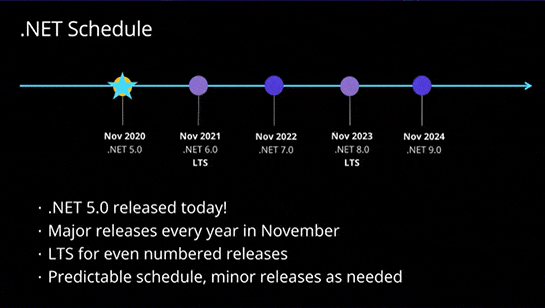
.NET 6 がリリースされましたねー。待望のLTS版です。メモメモ。。。
同じタイミングで、VisualStudio 2022もリリース。こっちもついに 64ビット化 されました。
.NET 6 のサポートは3年間。なので、2024/11 にサポート終了です。
次のLTSは、2023/11 予定の .NET 8。
マイルストーンとしてはこんな感じみたいです。PublicKeyさんの記事よりリンク拝借。
C# のバージョンも10 ですか、、、、。もう全然追いつけていないです、、、。
過去の記事については、以下のページからご参照下さい。
サンプルコードは、以下の場所で公開しています。
知らなかったので、忘れないうちにメモメモ。。。
dotnet new コマンドから .gitignore ファイルが生成できることを今日知りました。これは便利ですね。いつもプロジェクト作る度にどこかからコピーして持ってきてました。
以下を実行すると生成されます。
$ dotnet new gitignore
$ dotnet --info
.NET SDK (reflecting any global.json):
 Version:   5.0.402
 Commit:    e9d3381880

Runtime Environment:
 OS Name:     debian
 OS Version:  11
 OS Platform: Linux
 RID:         debian.11-x64
 Base Path:   /usr/share/dotnet/sdk/5.0.402/

Host (useful for support):
  Version: 5.0.11
  Commit:  f431858f8b

.NET SDKs installed:
  5.0.402 [/usr/share/dotnet/sdk]

.NET runtimes installed:
  Microsoft.AspNetCore.App 5.0.11 [/usr/share/dotnet/shared/Microsoft.AspNetCore.App]
  Microsoft.NETCore.App 5.0.11 [/usr/share/dotnet/shared/Microsoft.NETCore.App]

To install additional .NET runtimes or SDKs:
  https://aka.ms/dotnet-download


$ mkdir -p helloworld ; cd helloworld
$ dotnet new console
The template "Console Application" was created successfully.

Processing post-creation actions...
Running 'dotnet restore' on /workspaces/dotnet5env/helloworld/helloworld.csproj...
  Determining projects to restore...
  Restored /workspaces/dotnet5env/helloworld/helloworld.csproj (in 57 ms).
Restore succeeded.


#
# コレ
#
$ dotnet new gitignore
The template "dotnet gitignore file" was created successfully.
作成されました。
こんなファイルが生成されました。(2021-10-29時点)
## Ignore Visual Studio temporary files, build results, and
## files generated by popular Visual Studio add-ons.
##
## Get latest from https://github.com/github/gitignore/blob/master/VisualStudio.gitignore

# User-specific files
*.rsuser
*.suo
*.user
*.userosscache
*.sln.docstates

# User-specific files (MonoDevelop/Xamarin Studio)
*.userprefs

# Mono auto generated files
mono_crash.*

# Build results
[Dd]ebug/
[Dd]ebugPublic/
[Rr]elease/
[Rr]eleases/
x64/
x86/
[Ww][Ii][Nn]32/
[Aa][Rr][Mm]/
[Aa][Rr][Mm]64/
bld/
[Bb]in/
[Oo]bj/
[Ll]og/
[Ll]ogs/

# Visual Studio 2015/2017 cache/options directory
.vs/
# Uncomment if you have tasks that create the project's static files in wwwroot
#wwwroot/

# Visual Studio 2017 auto generated files
Generated\ Files/

# MSTest test Results
[Tt]est[Rr]esult*/
[Bb]uild[Ll]og.*

# NUnit
*.VisualState.xml
TestResult.xml
nunit-*.xml

# Build Results of an ATL Project
[Dd]ebugPS/
[Rr]eleasePS/
dlldata.c

# Benchmark Results
BenchmarkDotNet.Artifacts/

# .NET Core
project.lock.json
project.fragment.lock.json
artifacts/

# Tye
.tye/

# ASP.NET Scaffolding
ScaffoldingReadMe.txt

# StyleCop
StyleCopReport.xml

# Files built by Visual Studio
*_i.c
*_p.c
*_h.h
*.ilk
*.meta
*.obj
*.iobj
*.pch
*.pdb
*.ipdb
*.pgc
*.pgd
*.rsp
*.sbr
*.tlb
*.tli
*.tlh
*.tmp
*.tmp_proj
*_wpftmp.csproj
*.log
*.vspscc
*.vssscc
.builds
*.pidb
*.svclog
*.scc

# Chutzpah Test files
_Chutzpah*

# Visual C++ cache files
ipch/
*.aps
*.ncb
*.opendb
*.opensdf
*.sdf
*.cachefile
*.VC.db
*.VC.VC.opendb

# Visual Studio profiler
*.psess
*.vsp
*.vspx
*.sap

# Visual Studio Trace Files
*.e2e

# TFS 2012 Local Workspace
$tf/

# Guidance Automation Toolkit
*.gpState

# ReSharper is a .NET coding add-in
_ReSharper*/
*.[Rr]e[Ss]harper
*.DotSettings.user

# TeamCity is a build add-in
_TeamCity*

# DotCover is a Code Coverage Tool
*.dotCover

# AxoCover is a Code Coverage Tool
.axoCover/*
!.axoCover/settings.json

# Coverlet is a free, cross platform Code Coverage Tool
coverage*.json
coverage*.xml
coverage*.info

# Visual Studio code coverage results
*.coverage
*.coveragexml

# NCrunch
_NCrunch_*
.*crunch*.local.xml
nCrunchTemp_*

# MightyMoose
*.mm.*
AutoTest.Net/

# Web workbench (sass)
.sass-cache/

# Installshield output folder
[Ee]xpress/

# DocProject is a documentation generator add-in
DocProject/buildhelp/
DocProject/Help/*.HxT
DocProject/Help/*.HxC
DocProject/Help/*.hhc
DocProject/Help/*.hhk
DocProject/Help/*.hhp
DocProject/Help/Html2
DocProject/Help/html

# Click-Once directory
publish/

# Publish Web Output
*.[Pp]ublish.xml
*.azurePubxml
# Note: Comment the next line if you want to checkin your web deploy settings,
# but database connection strings (with potential passwords) will be unencrypted
*.pubxml
*.publishproj

# Microsoft Azure Web App publish settings. Comment the next line if you want to
# checkin your Azure Web App publish settings, but sensitive information contained
# in these scripts will be unencrypted
PublishScripts/

# NuGet Packages
*.nupkg
# NuGet Symbol Packages
*.snupkg
# The packages folder can be ignored because of Package Restore
**/[Pp]ackages/*
# except build/, which is used as an MSBuild target.
!**/[Pp]ackages/build/
# Uncomment if necessary however generally it will be regenerated when needed
#!**/[Pp]ackages/repositories.config
# NuGet v3's project.json files produces more ignorable files
*.nuget.props
*.nuget.targets

# Microsoft Azure Build Output
csx/
*.build.csdef

# Microsoft Azure Emulator
ecf/
rcf/

# Windows Store app package directories and files
AppPackages/
BundleArtifacts/
Package.StoreAssociation.xml
_pkginfo.txt
*.appx
*.appxbundle
*.appxupload

# Visual Studio cache files
# files ending in .cache can be ignored
*.[Cc]ache
# but keep track of directories ending in .cache
!?*.[Cc]ache/

# Others
ClientBin/
~$*
*~
*.dbmdl
*.dbproj.schemaview
*.jfm
*.pfx
*.publishsettings
orleans.codegen.cs

# Including strong name files can present a security risk
# (https://github.com/github/gitignore/pull/2483#issue-259490424)
#*.snk

# Since there are multiple workflows, uncomment next line to ignore bower_components
# (https://github.com/github/gitignore/pull/1529#issuecomment-104372622)
#bower_components/

# RIA/Silverlight projects
Generated_Code/

# Backup & report files from converting an old project file
# to a newer Visual Studio version. Backup files are not needed,
# because we have git ;-)
_UpgradeReport_Files/
Backup*/
UpgradeLog*.XML
UpgradeLog*.htm
ServiceFabricBackup/
*.rptproj.bak

# SQL Server files
*.mdf
*.ldf
*.ndf

# Business Intelligence projects
*.rdl.data
*.bim.layout
*.bim_*.settings
*.rptproj.rsuser
*- [Bb]ackup.rdl
*- [Bb]ackup ([0-9]).rdl
*- [Bb]ackup ([0-9][0-9]).rdl

# Microsoft Fakes
FakesAssemblies/

# GhostDoc plugin setting file
*.GhostDoc.xml

# Node.js Tools for Visual Studio
.ntvs_analysis.dat
node_modules/

# Visual Studio 6 build log
*.plg

# Visual Studio 6 workspace options file
*.opt

# Visual Studio 6 auto-generated workspace file (contains which files were open etc.)
*.vbw

# Visual Studio LightSwitch build output
**/*.HTMLClient/GeneratedArtifacts
**/*.DesktopClient/GeneratedArtifacts
**/*.DesktopClient/ModelManifest.xml
**/*.Server/GeneratedArtifacts
**/*.Server/ModelManifest.xml
_Pvt_Extensions

# Paket dependency manager
.paket/paket.exe
paket-files/

# FAKE - F# Make
.fake/

# CodeRush personal settings
.cr/personal

# Python Tools for Visual Studio (PTVS)
__pycache__/
*.pyc

# Cake - Uncomment if you are using it
# tools/**
# !tools/packages.config

# Tabs Studio
*.tss

# Telerik's JustMock configuration file
*.jmconfig

# BizTalk build output
*.btp.cs
*.btm.cs
*.odx.cs
*.xsd.cs

# OpenCover UI analysis results
OpenCover/

# Azure Stream Analytics local run output
ASALocalRun/

# MSBuild Binary and Structured Log
*.binlog

# NVidia Nsight GPU debugger configuration file
*.nvuser

# MFractors (Xamarin productivity tool) working folder
.mfractor/

# Local History for Visual Studio
.localhistory/

# BeatPulse healthcheck temp database
healthchecksdb

# Backup folder for Package Reference Convert tool in Visual Studio 2017
MigrationBackup/

# Ionide (cross platform F# VS Code tools) working folder
.ionide/

# Fody - auto-generated XML schema
FodyWeavers.xsd

##
## Visual studio for Mac
##


# globs
Makefile.in
*.userprefs
*.usertasks
config.make
config.status
aclocal.m4
install-sh
autom4te.cache/
*.tar.gz
tarballs/
test-results/

# Mac bundle stuff
*.dmg
*.app

# content below from: https://github.com/github/gitignore/blob/master/Global/macOS.gitignore
# General
.DS_Store
.AppleDouble
.LSOverride

# Icon must end with two \r
Icon


# Thumbnails
._*

# Files that might appear in the root of a volume
.DocumentRevisions-V100
.fseventsd
.Spotlight-V100
.TemporaryItems
.Trashes
.VolumeIcon.icns
.com.apple.timemachine.donotpresent

# Directories potentially created on remote AFP share
.AppleDB
.AppleDesktop
Network Trash Folder
Temporary Items
.apdisk

# content below from: https://github.com/github/gitignore/blob/master/Global/Windows.gitignore
# Windows thumbnail cache files
Thumbs.db
ehthumbs.db
ehthumbs_vista.db

# Dump file
*.stackdump

# Folder config file
[Dd]esktop.ini

# Recycle Bin used on file shares
$RECYCLE.BIN/

# Windows Installer files
*.cab
*.msi
*.msix
*.msm
*.msp

# Windows shortcuts
*.lnk

# JetBrains Rider
.idea/
*.sln.iml

##
## Visual Studio Code
##
.vscode/*
!.vscode/settings.json
!.vscode/tasks.json
!.vscode/launch.json
!.vscode/extensions.json
過去の記事については、以下のページからご参照下さい。
サンプルコードは、以下の場所で公開しています。
以前、Gitpod で .NET 5 の環境を作って遊ぶ件で
という記事を書いているのですが、2021-09-17 時点で dotnet build とか dotnet run とかを実行しようとすると
$ dotnet run
/usr/share/dotnet/sdk/5.0.401/Roslyn/Microsoft.CSharp.Core.targets(71,5): error MSB6004: The specified task executable location "/run/containerd/io.containerd.runtime.v2.task/k8s.io/89d0650c1efde0dacd4438d23abb33c8a6bf7148e8158f7ffba828bab9d9cead/rootfs/usr/share/dotnet/dotnet" is invalid. [/workspace/dotnettmp/helloworld/helloworld.csproj]

The build failed. Fix the build errors and run again.
というエラーが出て実行できない状態になっています。Gitpod 側で用意してくれているコンテナにてなんか発生している模様。
掲示板の方でも
って感じで上がってます。
上のリンクから辿れる github issue の方に載ってるように
そのまま実行すると、現時点ではどうやってもエラーが出るので、docker経由で実行したら行けました。
$ docker run -it --rm -w /opt/app -v $PWD:/opt/app mcr.microsoft.com/dotnet/sdk:5.0 dotnet run
Hello World!
dotnetなプロジェクトに関しては、Github Codespaces の方がやりやすいですねーやっぱり。
C#のプラグインも Microsoft 謹製のものがインストール出来ますので。(Gitpod だと MS謹製 のものはデバッガのライセンスの関係などでインストールできない)
過去の記事については、以下のページからご参照下さい。
サンプルコードは、以下の場所で公開しています。
忘れない内にメモメモ。
VisualStudioがバージョン 2022 で遂に 64ビットアプリになるみたいですね。
the first public preview of Visual Studio 2022 will be released this summer.
って書いてるので、最初のプレビュー版が出るのが今年の夏頃みたいです。
また、.NET Multi-platform App UI (MAUI) を搭載するので、クロスプラットフォームなアプリも開発しやすくなる模様。

上は上記ブログ記事の画像
また、Flutter2 のようなホットリロード機能もあるみたいですねー。
あと、デフォルトのフォントが consolas から csscadia-code に変わるっぽい。
過去の記事については、以下のページからご参照下さい。
サンプルコードは、以下の場所で公開しています。
以下、自分用メモです。
dotnet build を実行すると通常以下のようにロゴとかビルド対象のプロジェクトとかが出力されます。
gitpod /workspace/try-csharp $ dotnet build
Microsoft (R) Build Engine version 16.9.0+57a23d249 for .NET
Copyright (C) Microsoft Corporation. All rights reserved.

  Determining projects to restore...
  All projects are up-to-date for restore.
  TryCSharp.Common -> /workspace/try-csharp/TryCSharp.Common/bin/Debug/net5.0/TryCSharp.Common.dll
  TryCSharp.Samples -> /workspace/try-csharp/TryCSharp.Samples/bin/Debug/net5.0/TryCSharp.Samples.dll
  TryCSharp.Tools.Cui -> /workspace/try-csharp/TryCSharp.Tools.Cui/bin/Debug/net5.0/TryCSharp.Tools.Cui.dll

Build succeeded.
    0 Warning(s)
    0 Error(s)

Time Elapsed 00:00:05.43
こんなに出力イラネって場合は、 --nologo オプションをつけるとちょっとだけ少なくなります。
gitpod /workspace/try-csharp $ dotnet build --nologo
  Determining projects to restore...
  All projects are up-to-date for restore.
  TryCSharp.Common -> /workspace/try-csharp/TryCSharp.Common/bin/Debug/net5.0/TryCSharp.Common.dll
  TryCSharp.Samples -> /workspace/try-csharp/TryCSharp.Samples/bin/Debug/net5.0/TryCSharp.Samples.dll
  TryCSharp.Tools.Cui -> /workspace/try-csharp/TryCSharp.Tools.Cui/bin/Debug/net5.0/TryCSharp.Tools.Cui.dll

Build succeeded.
    0 Warning(s)
    0 Error(s)

Time Elapsed 00:00:01.43
さらに、プロジェクトの出力もイラネって場合は -v q を追加するともう少し出力が少なくなります。
gitpod /workspace/try-csharp $ dotnet build --nologo -v q

Build succeeded.
    0 Warning(s)
    0 Error(s)

Time Elapsed 00:00:01.13
過去の記事については、以下のページからご参照下さい。
サンプルコードは、以下の場所で公開しています。
以下、自分用メモです。
久しぶりに、自分のC#サンプル リポジトリをコンパイルしてみたら
以下のような警告がブワーって出てびっくり。
gitpod /workspace/try-csharp $ make run
dotnet clean --nologo -v q

Welcome to .NET 5.0!
---------------------
SDK Version: 5.0.202

Telemetry
---------
The .NET tools collect usage data in order to help us improve your experience. It is collected by Microsoft and shared with the community. You can opt-out of telemetry by setting the DOTNET_CLI_TELEMETRY_OPTOUT environment variable to '1' or 'true' using your favorite shell.

Read more about .NET CLI Tools telemetry: https://aka.ms/dotnet-cli-telemetry

----------------
Installed an ASP.NET Core HTTPS development certificate.
To trust the certificate run 'dotnet dev-certs https --trust' (Windows and macOS only).
Learn about HTTPS: https://aka.ms/dotnet-https
----------------
Write your first app: https://aka.ms/dotnet-hello-world
Find out what's new: https://aka.ms/dotnet-whats-new
Explore documentation: https://aka.ms/dotnet-docs
Report issues and find source on GitHub: https://github.com/dotnet/core
Use 'dotnet --help' to see available commands or visit: https://aka.ms/dotnet-cli
--------------------------------------------------------------------------------------


dotnet restore -v q
dotnet run --project TryCSharp.Tools.Cui/TryCSharp.Tools.Cui.csproj --onetime
/workspace/try-csharp/TryCSharp.Samples/Advanced/RuntimeHelpersSamples02.cs(73,14): warning SYSLIB0004: 'ReliabilityContractAttribute' is obsolete: 'The Constrained Execution Region (CER) feature is not supported.' [/workspace/try-csharp/TryCSharp.Samples/TryCSharp.Samples.csproj]
/workspace/try-csharp/TryCSharp.Samples/Advanced/RuntimeHelpersSamples02.cs(73,34): warning SYSLIB0004: 'Consistency' is obsolete: 'The Constrained Execution Region (CER) feature is not supported.' [/workspace/try-csharp/TryCSharp.Samples/TryCSharp.Samples.csproj]
/workspace/try-csharp/TryCSharp.Samples/Advanced/RuntimeHelpersSamples02.cs(73,67): warning SYSLIB0004: 'Cer' is obsolete: 'The Constrained Execution Region (CER) feature is not supported.' [/workspace/try-csharp/TryCSharp.Samples/TryCSharp.Samples.csproj]
/workspace/try-csharp/TryCSharp.Samples/Advanced/RuntimeHelpersSamples03.cs(61,14): warning SYSLIB0004: 'ReliabilityContractAttribute' is obsolete: 'The Constrained Execution Region (CER) feature is not supported.' [/workspace/try-csharp/TryCSharp.Samples/TryCSharp.Samples.csproj]
/workspace/try-csharp/TryCSharp.Samples/Advanced/RuntimeHelpersSamples03.cs(61,34): warning SYSLIB0004: 'Consistency' is obsolete: 'The Constrained Execution Region (CER) feature is not supported.' [/workspace/try-csharp/TryCSharp.Samples/TryCSharp.Samples.csproj]
/workspace/try-csharp/TryCSharp.Samples/Advanced/RuntimeHelpersSamples03.cs(61,67): warning SYSLIB0004: 'Cer' is obsolete: 'The Constrained Execution Region (CER) feature is not supported.' [/workspace/try-csharp/TryCSharp.Samples/TryCSharp.Samples.csproj]
/workspace/try-csharp/TryCSharp.Samples/Advanced/SerializationSurrogateSamples01.cs(29,17): warning SYSLIB0011: 'BinaryFormatter.Serialize(Stream, object)' is obsolete: 'BinaryFormatter serialization is obsolete and should not be used. See https://aka.ms/binaryformatter for more information.' [/workspace/try-csharp/TryCSharp.Samples/TryCSharp.Samples.csproj]
/workspace/try-csharp/TryCSharp.Samples/Advanced/SerializationSurrogateSamples01.cs(32,34): warning SYSLIB0011: 'BinaryFormatter.Deserialize(Stream)' is obsolete: 'BinaryFormatter serialization is obsolete and should not be used. See https://aka.ms/binaryformatter for more information.' [/workspace/try-csharp/TryCSharp.Samples/TryCSharp.Samples.csproj]
/workspace/try-csharp/TryCSharp.Samples/Advanced/SerializationSurrogateSamples01.cs(47,21): warning SYSLIB0011: 'BinaryFormatter.Serialize(Stream, object)' is obsolete: 'BinaryFormatter serialization is obsolete and should not be used. See https://aka.ms/binaryformatter for more information.' [/workspace/try-csharp/TryCSharp.Samples/TryCSharp.Samples.csproj]
/workspace/try-csharp/TryCSharp.Samples/Advanced/SerializationSurrogateSamples01.cs(50,38): warning SYSLIB0011: 'BinaryFormatter.Deserialize(Stream)' is obsolete: 'BinaryFormatter serialization is obsolete and should not be used. See https://aka.ms/binaryformatter for more information.' [/workspace/try-csharp/TryCSharp.Samples/TryCSharp.Samples.csproj]
/workspace/try-csharp/TryCSharp.Samples/Advanced/SerializationSurrogateSamples01.cs(89,21): warning SYSLIB0011: 'BinaryFormatter.Serialize(Stream, object)' is obsolete: 'BinaryFormatter serialization is obsolete and should not be used. See https://aka.ms/binaryformatter for more information.' [/workspace/try-csharp/TryCSharp.Samples/TryCSharp.Samples.csproj]
/workspace/try-csharp/TryCSharp.Samples/Advanced/SerializationSurrogateSamples01.cs(92,38): warning SYSLIB0011: 'BinaryFormatter.Deserialize(Stream)' is obsolete: 'BinaryFormatter serialization is obsolete and should not be used. See https://aka.ms/binaryformatter for more information.' [/workspace/try-csharp/TryCSharp.Samples/TryCSharp.Samples.csproj]
/workspace/try-csharp/TryCSharp.Samples/Advanced/RuntimeHelpersSamples03.cs(30,13): warning SYSLIB0004: 'RuntimeHelpers.ExecuteCodeWithGuaranteedCleanup(RuntimeHelpers.TryCode, RuntimeHelpers.CleanupCode, object?)' is obsolete: 'The Constrained Execution Region (CER) feature is not supported.' [/workspace/try-csharp/TryCSharp.Samples/TryCSharp.Samples.csproj]
/workspace/try-csharp/TryCSharp.Samples/Advanced/RuntimeHelpersSamples02.cs(30,13): warning SYSLIB0004: 'RuntimeHelpers.PrepareConstrainedRegions()' is obsolete: 'The Constrained Execution Region (CER) feature is not supported.' [/workspace/try-csharp/TryCSharp.Samples/TryCSharp.Samples.csproj]
表示されている内容を見てみると、昔に書いたサンプルでCERを使っているところと、BinaryFormatterを使っている部分で出ている模様。.NET 5 になる前はこんなに出てなかったんですけどね。。。
で、ドキュメント見てみると、.NET 5 から警告を出すように変わっていたんですね。
CERの部分で、出ている警告はこれ。(SYSLIB0004) まあ、いまさらCERを使うことなんてないですが。
BinaryFormatterの部分で、出ている警告はこれ。(SYSLIB0011) BinaryFormatterは、今時ほぼ利用しないと思いますが、古いソースとかでは結構まだ出てきたりします。オブジェクトを簡易deep-copyしたい場合とか。
BinaryFormatterに関しては、セキュリティガイドも出ていますね。
要は「使うな」ってことが記載されています。
とはいえ、事情により使用しないといけないので、警告を抑制したい場合などは現実世界ではちょこちょこあったりします。
その場合、2通りの方法がある模様。
// 抑制
#pragma warning disable SYSLIB0011


// 抑制解除
#pragma warning restore SYSLIB0011
<Project Sdk="Microsoft.NET.Sdk">
  <PropertyGroup>
   <TargetFramework>net5.0</TargetFramework>
   <!-- プロジェクト全体で SYSLIB0004 と SYSLIB0011 を抑制 -->
   <NoWarn>$(NoWarn);SYSLIB0004;SYSLIB0011</NoWarn>
  </PropertyGroup>
</Project>
過去の記事については、以下のページからご参照下さい。
サンプルコードは、以下の場所で公開しています。
先日、.NET 5 がリリースされましたので、Gitpodで使えるように調整してみました。
忘れないうちにメモメモ。
補足:2021-03-16 現在、最新の gitpod/workspace-dotnet では、.NET 5 がインストールされています。なので、以下の手順はもう必要ありません。
.NET 5.0 リリースに関しては、以下のメモもよかったら参照ください。
.gitpod.Dockerfile の調整現状(2020-11-27現在)で、Gitpod 側が用意してくれている dotnet 向けの docker image は以下。
.NET Core 3.1 をインストールするようになっているので、このイメージをベースにして .NET 5.0 を入れるようにします。
以下のような感じで .gitpod.Dockerfile を用意
FROM gitpod/workspace-dotnet

RUN wget https://packages.microsoft.com/config/ubuntu/20.04/packages-microsoft-prod.deb -O packages-microsoft-prod.deb \
    && sudo dpkg -i packages-microsoft-prod.deb

RUN sudo apt-get update \
    && sudo apt-get install -y apt-transport-https \
    && sudo apt-get update \
    && sudo apt-get install -y dotnet-sdk-5.0 \
    && sudo rm -rf /var/lib/apt/lists/*

# installed the dotnet packages from apt command, so clear the DOTNET_ROOT environment variable.
ENV DOTNET_ROOT=
Gitpod の ワークスペース で利用するOSは現在 Ubuntu 20.04 になっているので、
$ cat /etc/os-release
NAME="Ubuntu"
VERSION="20.04 LTS (Focal Fossa)"
ID=ubuntu
ID_LIKE=debian
PRETTY_NAME="Ubuntu Focal Fossa (development branch)"
VERSION_ID="20.04"
HOME_URL="https://www.ubuntu.com/"
SUPPORT_URL="https://help.ubuntu.com/"
BUG_REPORT_URL="https://bugs.launchpad.net/ubuntu/"
PRIVACY_POLICY_URL="https://www.ubuntu.com/legal/terms-and-policies/privacy-policy"
VERSION_CODENAME=focal
UBUNTU_CODENAME=focal
インストール方法は以下を見て調整しました。
注意点として、gitpod/workspace-dotnet 内で、dotnet のインストール先をデフォルトから変更しているので内部で DOTNET_ROOT 環境変数を設定しています。今回は、apt でパッケージインストールしているので、この環境変数をクリアします。そうしないと、dotnet run とかした時に内部で見に行くツールチェインの向きがDOTNET_ROOT の方を見てしまうので .NET 5.0 コンパチのプログラム書くとエラーになります。
以下の部分で環境変数をクリアしています。
# installed the dotnet packages from apt command, so clear the DOTNET_ROOT environment variable.
ENV DOTNET_ROOT=
.gitpod.yml の調整後は、.gitpod.yml にて上記の dockerfile を利用するよう調整して終わりです。
image:
  file: .gitpod.Dockerfile

tasks:
  - init: dotnet restore
    command: dotnet clean && dotnet build

vscode:
  extensions:
    - ms-vscode.csharp@1.21.12:kw8SkO8+aVTSFug281WfQQ==
これでオケ。
ちゃんと入っているか確認。
$ dotnet --list-sdks
5.0.100 [/usr/share/dotnet/sdk]

$ dotnet --info
.NET SDK (reflecting any global.json):
 Version:   5.0.100
 Commit:    5044b93829

Runtime Environment:
 OS Name:     ubuntu
 OS Version:  20.04
 OS Platform: Linux
 RID:         ubuntu.20.04-x64
 Base Path:   /usr/share/dotnet/sdk/5.0.100/

Host (useful for support):
  Version: 5.0.0
  Commit:  cf258a14b7

.NET SDKs installed:
  5.0.100 [/usr/share/dotnet/sdk]

.NET runtimes installed:
  Microsoft.AspNetCore.App 5.0.0 [/usr/share/dotnet/shared/Microsoft.AspNetCore.App]
  Microsoft.NETCore.App 5.0.0 [/usr/share/dotnet/shared/Microsoft.NETCore.App]

To install additional .NET runtimes or SDKs:
  https://aka.ms/dotnet-download
以下にサンプルリポジトリつくってあるので、よければご参照ください。
C# 9.0 の構文を使うとエディタで赤い波線が表示される環境は上記で出来るのですが、Gitpod 上で利用する VSCode の C# 拡張機能 のバージョンが古い AND mono に付属している msbuild のバージョンが古いみたいで、コンパイル自体は出来るけど赤い破線は現状消えない状態です。
この件については、以下のように記載がありました。
Note about using .NET 5 SDKs
The .NET 5 SDK requires version 16.8 of MSBuild.
For Windows users who have Visual Studio installed, this means you will need to be on the latest Visual Studio 16.8 Preview. For MacOS and Linux users who have Mono installed, this means you will need to set omnisharp.useGlobalMono to never until a version of Mono ships with MSBuild 16.8.
gitpod 上で msbuild のバージョンを見てみると
$ msbuild -version
msbuild -version
Microsoft (R) Build Engine version 16.6.0 for Mono
Copyright (C) Microsoft Corporation. All rights reserved.

16.6.0.32601
なので、ちょっとバージョンが足りていない状態ですね。まあ試すだけなので個人的には問題なしです。
過去の記事については、以下のページからご参照下さい。
サンプルコードは、以下の場所で公開しています。
